


This article is relevant to United States customers only. If you are not a US customer, see Canadian fees or view UK fees.
Table of contents
- Overview
- What changed?
- Fee overview
- Your GotPhoto invoices
- Billing system comparison
- Invoice sample: Invoice-based billing
- New invoice sections explained
- FAQ
- The takeaway
Overview
This article explains how GotPhoto calculates and bills your fees. Note that GotPhoto uses different rounding rules for order fees versus amounts deducted when a customer places an order.
Update April 2026:
As announced earlier this year, we've upgraded our invoicing system to provide more precise and transparent billing. Instead of using rolling balances, payments will now be matched directly to individual invoices. This change helps you clearly see which invoices are paid and which remain outstanding, making reconciliation much easier. The changes were rolled out gradually to all users. In this article, you’ll find a detailed explanation of what’s changing and how it affects you.
What changed?
We moved all customers from Rolling Balance Billing to Invoice-Based Billing. What this means:
- Legacy (Rolling Balance Billing): Unpaid fees from previous invoices were carried over between billing periods.
- New (Invoice-Based Billing): Each invoice that was created after your account migrated to the new billing type is handled separately and must be paid separately.
Fee overview
There are three main types of fees GotPhoto may charge:
1. Standard fees
- Monthly subscription: Applies unless you're on an Enterprise plan. Switch to annual here.
- Service fee: Applied per order on gross revenue.
- Payment fees:
- $0.30 per order
- 2.9% transaction fee per order

2. Sales tax
GotPhoto acts as a Marketplace Facilitator, collecting sales tax from customer payments. These are displayed on the order page as part of the Photographer Fee Payment. Even in the case of disputed or blocked payments, the sales tax line may still appear unless canceled.

3. [Optional] Other charges, if applicable to your workflow
- Fees for basic editing or background removal
- Manual order entry: A per-order fee is applied (instead of the regular service fee that is applied on shop orders). Pricing depends on your plan or contract and may vary between €0.75 per order (Pro plan), $1.00 per order (Growth plan), and $2.00 per order (Free plan). Custom plans may qualify for a lower rate.
- Entagged subscription fee
Rounding rules
GotPhoto calculates service and payment fees using four decimal places for accuracy, but rounds visible charges to two decimal places. This may result in a negative or positive account balance.
Example:
- Service fee: 7% of $45.24 → $3.1668 → charged as $3.17
- Payment fee: 2.9% + $0.30 → $1.268 + $0.30 = $1.568 → charged as $1.57

These rounding practices also apply to manual Order Entry orders. Monthly invoice differences are normal and reconciled in your balance.
Prepay note: If you request a payout before sales tax is billed, your balance may go negative in the next cycle.
Your GotPhoto invoices
You’ll receive your GotPhoto invoices via email, and you can also access them in your GotPhoto Admin under User Name > My Account > Finances > Financial Reports > Invoices.
Invoices for the previous month are available on the first day of each month.
Gradual shift from a rolling invoice balance to invoice-matching billing (completed on April 1, 2026).
Previously, outstanding amounts were carried over to the next invoice. To improve reconciliation, we introduced a new system where each invoice is handled individually.
This makes it easy to see which invoices are paid and which remain outstanding.
What are the changes you will notice in your account?
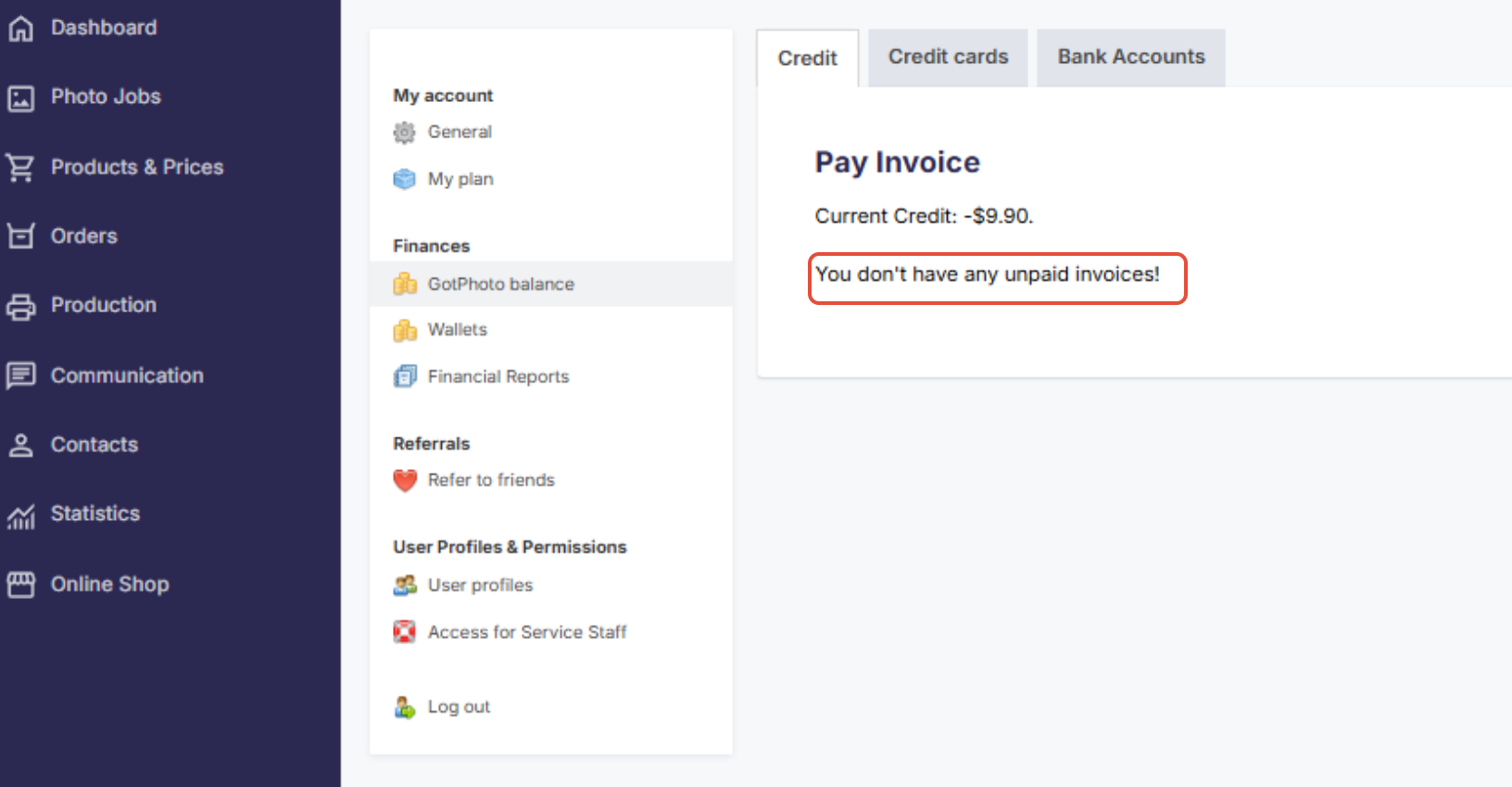
- If you paid all invoices that were created after your account was migrated to the new invoice-based billing, your GotPhoto Balance will indicate that.
- If your account has unpaid legacy invoices from the previous billing system, we will display them in your Invoices section where you can pay your legacy balance (to get there, click your username in the upper right of your dashboard > Finances> Invoices).
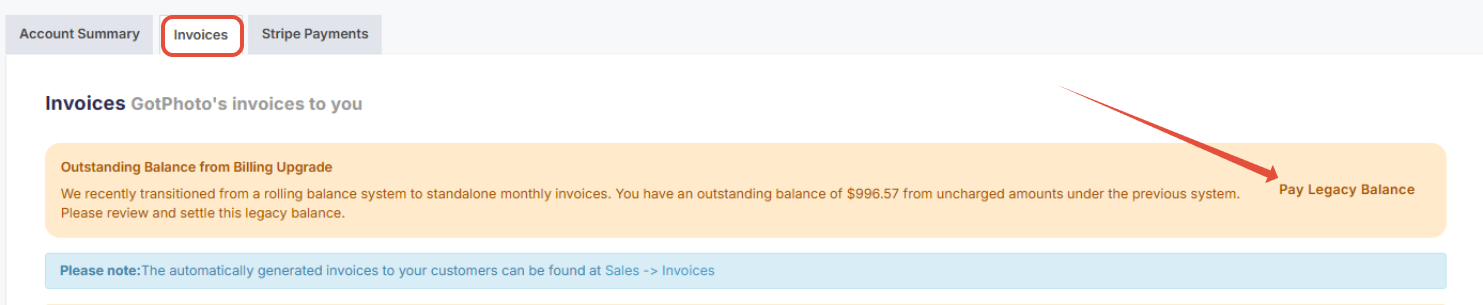
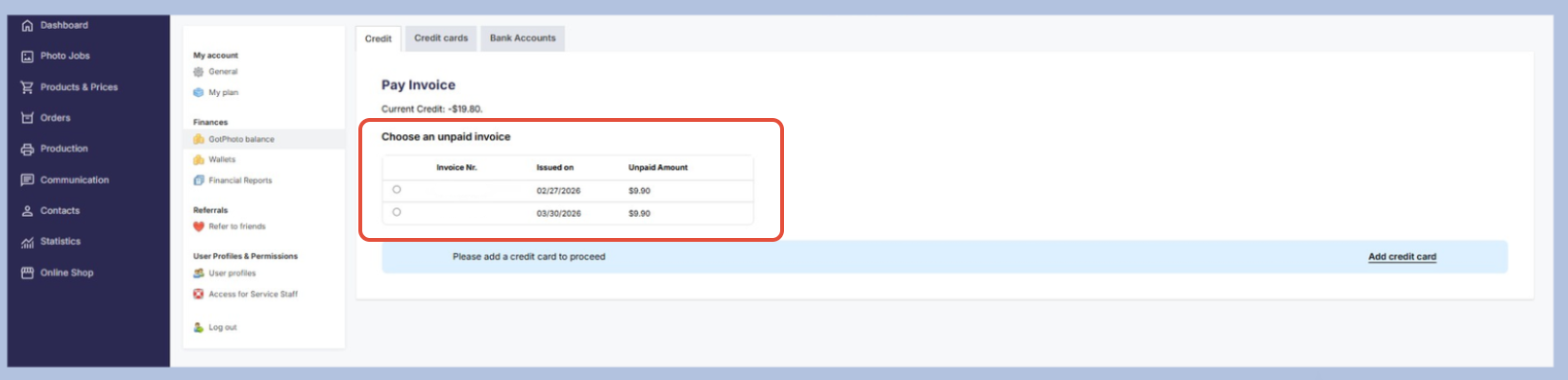
- With the new billing type, each invoice must be paid separately.
- If you have not saved a credit card yet, please do so.
Billing system comparison
| Feature | Legacy (Rolling Balance Billing) | New (Invoice-Based Billing) |
|---|---|---|
| How charges are handled | Balances could carry over between billing periods | Each invoice reflects a specific billing period only |
| How payments work | Outstanding amounts appeared on the next invoice | Each unpaid invoice must be paid separately |
| How to identify unpaid fees from previous invoices | You saw carried-over balances on the invoice | You see individual unpaid invoices in GotPhoto Balance (if applicable)* |
| Who uses it | - | All customers (The migration of all customers was finalized on April 1, 2026). |
*This applies to invoices generated after the switch to the new invoice-based billing..
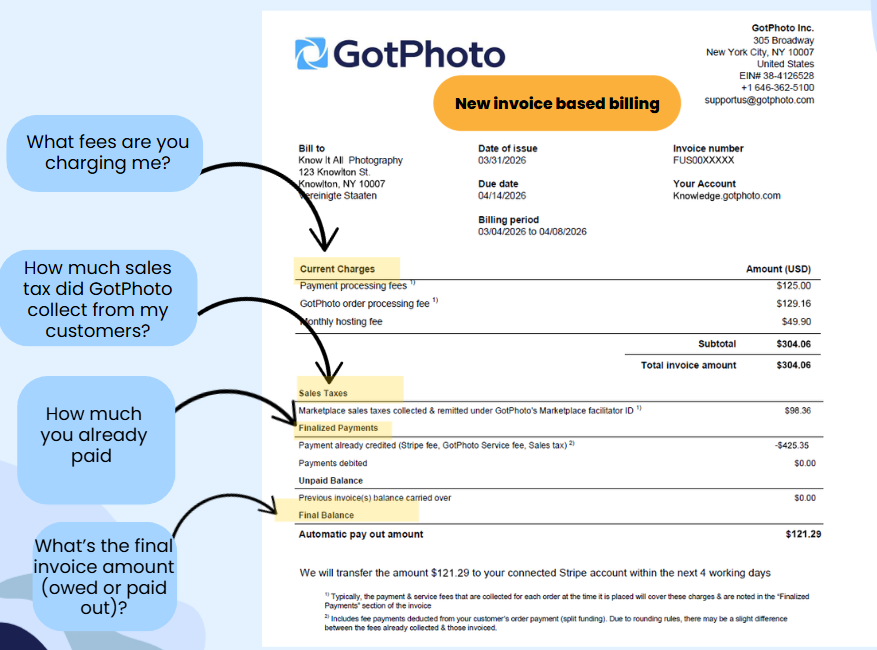
Invoice sample: Invoice-based billing
New invoice sections explained
- Current charges section
- Payment processing fees are $.30 per order + 2.9% transaction fee (Stripe). This is the payment processing fee charged by Stripe Express.
- GotPhoto order processing fees are a percentage, dependent on your plan type, applied per order to gross revenue.
- This is the fee that GotPhoto takes on each sale for using our platform.
- Example: If you’re on the Pro plan, your service fee is 7%. This means a service fee equal to 7% of each order’s gross revenue is charged.
- Monthly hosting fees
- This includes your monthly subscription (Your GotPhoto Plan: Free, Growth, and Pro), if applicable. If you're on an annual plan, the annual fee is charged in the month following the activation of the annual plan.
This section can also include Editing Fees, Order Entry fees under $50, and/or Entagged subscription fees if you utilize any of these services.
- Sales Tax section
- The Sales Tax amount shows the total amount of Sales Tax that GotPhoto has collected and remitted from your customers as a Marketplace facilitator.
- This is a reflection of the sales tax collected. You won't be billed this amount.
- Finalized Payments
- Includes the total of payment fees, service fees, and sales tax that were collected at the time of sale, as well as any payins you proceeded during the invoice cycle (if applicable).
- These are the fees that have already been processed and settled.
- Final Balance section
- This amount will reflect either a negative balance, which is the amount that you owe GotPhoto, or a positive balance. Positive balances are funds that will be credited to your Stripe account at the end of the month.
- There can be small discrepancies due to rounding as we calculate fees to four decimal places.
FAQ
How much does it cost to deliver a digital download to a customer?
Digital download products on GotPhoto do not incur any production costs. However, the order will still be subject to your plan’s specific order service fee.
Why do I need to pay invoices separately now?
Under the new invoice-based billing system, each invoice is matched and tracked individually. This makes it easier to see which invoices are paid and which remain outstanding.
The takeaway
We've upgraded our invoicing system to make billing more precise and transparent. Instead of using rolling balances, payments are now applied directly to individual invoices. Since April 2026, this invoicing system has been available to all customers.