

This FAQ answers common questions about the New Shop, which is now the standard shop for all photo jobs. It covers supported features, how the New Shop differs from the legacy shop, and current limitations.
The Timeline
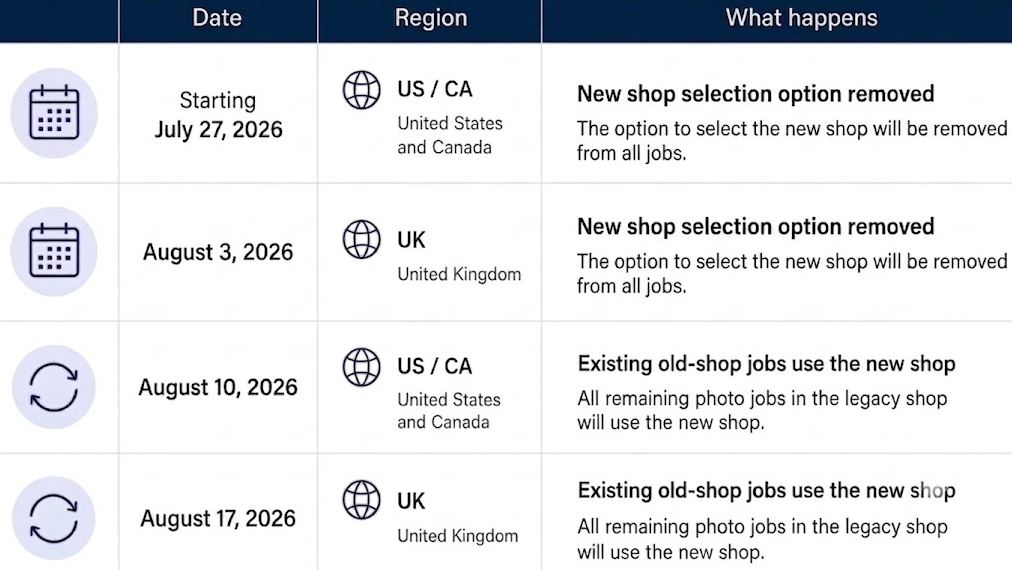
The New Shop
Is this the same New Shop that has been available since 2025?
Yes. It is the same shop that was introduced in 2025 and has been continuously improved based on photographer feedback. The New Shop is now the standard shop for all photo jobs.
How does the New Shop differ from the legacy shop?
The New Shop keeps the familiar structure of the legacy shop, including packages, à la carte products, and pose selection per package. It also offers a cleaner shopping experience for families purchasing photos of multiple subjects and is optimized for mobile devices, which account for more than 80% of shop traffic.
Thanks to these improvements and ongoing optimizations based on photographer feedback, photographers using the New Shop see an average 10% increase in sales (measured by GMV per activated access code). For school and nursery photo jobs, sales can increase by up to 20%, while the mobile-optimized experience delivers a 44% higher mobile conversion rate.
Is the New Shop now used for all photo jobs?
Yes. The New Shop is now the standard shop for all photo jobs. New photo jobs automatically use the New Shop, and existing legacy photo jobs have been transitioned to it.
Can I continue using the legacy shop or switch back to it?
No. The legacy shop is no longer available for photo jobs. All photo jobs now use the New Shop.
Which languages does the New Shop currently support?
The New Shop currently supports English, German, French, Spanish, Turkish, Polish, and Russian.
Are there features from the legacy shop that are not available in the New Shop?
A small number of features work differently or are not currently available in the New Shop. You can find the list here. Where possible, we provide alternatives for features that are not currently supported.
Will anything change for photographers who handle fulfillment themselves?
No. Price lists with self-fulfilled items are fully supported.
What features does the New Shop include?
- Professional Retouching, shown prominently at checkout
- Yearbook selection deadline
- Content protection to help prevent screenshots and unauthorized downloads
- Pre-registration Quick Login Link
- Abandoned Cart reminder
- Clean and modern UI, optimized for mobile devices
Global and Public Access
Does the New Shop support the Global Access Code?
Yes. The Global Access Code that grants schools and other clients easy access to all photos works in the New Shop as it did in the legacy shop. Please note that the additional features Global Connection Code and Find Your Access Code are not available in the New Shop. The Global Access Code cannot be restricted to viewing only; parents will always be able to place orders. This behavior is unchanged. Learn more about the global access code here:Global Access Code: Grant access to all photos with just one code
Does the New Shop support One Access Code photo jobs?
Yes. The One Access Code access type is fully supported in the New Shop.
The album view is available for both One Access Code photo jobs and the Global Access Code. Please note that subalbums are not supported. Learn more here: One Access Code workflow for event galleries
Can I create new public photo jobs in the New Shop?
No. Public photo jobs are not supported in the New Shop. Alternatively, you can use the One Access Code access type. It provides a similarly simple experience while adding an important layer of privacy and security. Learn more here: One Access Code workflow for event galleries.
Can orders from individual access codes and One Access Code photo jobs be combined?
Yes. This is fully supported.
Albums and Photo Visibility
How do separate albums work in the New Shop?
The album view is available for One Access Code photo jobs and when using a Global Access Code. The album view is not currently available for photo jobs with individual access codes, but we would like to support this in the future. If you assign different price lists to individual albums in Photo Management, parents will still see the correct prices for each photo they select.
Photos from albums set to Available for everyone also appear in the package selection and the à la carte section, where parents can find them using the group photo filter and pagination.
Are photos displayed at the same quality as in the legacy shop?
Yes. Image quality and clarity are the same. The option to zoom in on photos is not currently available.
Packages and Products
Can single-pose packages be restricted in the New Shop?
Yes. If you restrict a package to a single pose, parents can only select one pose for all products in that package.
Can background choices be restricted for single-pose packages?
The option to restrict single-pose packages to a single background is not currently available in the New Shop.
Are personalizable lab products, such as Trader Cards that require text input, supported?
Yes. Personalizable lab products that require parents to enter text are supported in the New Shop.
Are custom products from my own production supported in the New Shop?
Yes. They are fully supported.
Can parents fill packages from their wishlist?
Parents can add photos to their wishlist and order à la carte items from it. The option to fill packages with photos from the wishlist is planned for a future update.
Prepay and Session Fees
Does the New Shop affect Prepay photo jobs?
No. Prepay photo jobs use a separate shop and are not affected. You can continue to set up and manage Prepay photo jobs as before.
Order History
Can parents see their order history in the New Shop?
Parent order history is not currently available in the New Shop.
Retouching
Can photographers offer retouching in the New Shop?
Yes. The Professional Retouching product is shown prominently at checkout. You can handle retouching yourself or use GotPhoto's AI-powered retouching service, with three retouching levels available and an optional review step. Learn more here: Offer the Professional Retouching add-on in GotPhoto
Content Protection and SnapShield
Is screenshot and content protection available on mobile devices?
Yes. Long-press actions on mobile devices are disabled in the New Shop. Parents must confirm a content protection notice before accessing the shop. You can manage this setting in your admin area under Online Shop > Shop Settings > Content Protection. Learn more here: Content protection: Prevent screenshots and reduce image theft in your GotPhoto shop
Do I need to update my SnapShield settings for the New Shop?
If you previously used SnapShield only in the legacy shop, make sure your SnapShield embed key is configured for the New Shop. Enter your SnapShield embed key in your GotPhoto admin area under Online Shop > Shop Settings > Content Protection, select SnapShield, enter your embed key, and click Save.
Branding and Customization
When will options to customize button colors and other branding elements be available?
There is no timeline to share yet. We are prioritizing shop stability and improvements that enhance the shopping experience for parents and help drive sales. Additional customization options may be added at a later stage.
Is custom HTML supported?
No. Custom HTML (Your Code in the shop settings) is currently not supported in the New Shop.
Can pre-registration be used with the New Shop?
Yes. The New Shop includes an updated pre-registration page optimized for both desktop and mobile devices.
Support for Additional Features
What happens to free download products in my price list?
Free downloads are not currently supported and hidden in the New Shop, therefore, we recommend you remove them. As an alternative, you can add a digital download product and set its price to zero.
Do automatic photo effects applied on upload work in the New Shop?
No. Automatic photo effects applied on upload are not supported and will be hidden in the New Shop. Instead, customers can choose from your enabled photo effects for each individual photo.
Does Google Analytics track my shop?
The Google Analytics field in your admin area is greyed out because Google Analytics is currently not supported in the New Shop.